




Key takeaways
- Understanding your internet type can ensure you’re getting the speeds you need
- Fiber provides the fastest and most reliable internet connection
- You can find out what type of internet you have by looking at your equipment
You might already know there are different types of internet services. DSL, cable internet, fiber optic, satellite and fixed wireless internet are some of the most popular kinds. But how do you know what type of connection you have at your home? And why does it matter?
Don’t let the type of internet you have be a mystery to you any longer. Find out all you need to know about the broadband connection you have at your home. Here’s how to tell what type of internet you have.
Why you need to know what internet connection type you have
You may not have been the person to shop and sign up for the internet service provider (ISP) you currently use. Maybe you moved into a home or apartment that already had internet service included, or perhaps you just weren’t involved in the initial decision. Whatever the case, the type of internet connection you have might be unknown.
But if you need to work from home, teach or learn remotely or do other activities that require a fast and stable internet connection, you need to know the type of internet you have. Why? To make sure you are getting the best connection for what you and your family are using the internet to accomplish.
Can I tell what type of internet connection I have by the service provider?
Not necessarily. Even if you know the company that provides your internet, it isn’t always obvious what type of connection you have. Several ISPs — such as AT&T, CenturyLink and Frontier — offer more than one type of internet connection under their brand name. It isn’t uncommon for an internet provider to offer DSL, fiber and fixed wireless kinds of connections.
Find out what type of internet connection you have
There is more than one method to determine what type of internet connection your home has. Check out these quick and easy ways to find out what type of connection you are working with.
Find out your internet connection type by equipment
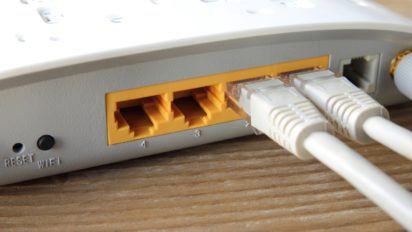
Take a few minutes to locate and examine the internet equipment around your house. Locate your modem and router and see what wires are connected to it. Most current modem and router combos, also known as gateways, will have the type of internet connection clearly marked on the device. But if your modem or router is not labeled, simply find the description below that matches your home set up to determine your internet connection type.
- Do you have a satellite on your roof that controls your internet? Then you are using satellite internet.
- Look at the type of plug your modem is connected to on the wall. If it is connected with a coaxial cable, then you are most likely dealing with a cable internet connection. However, if the other end of that coaxial cable connects to a satellite outside your home, then you have a satellite connection.
- If you find that the modem is connected with what looks like a phone line, you have either DSL or dial-up internet. If using the internet in your home also ties up the phone line (i.e., you can’t place or receive calls on your home phone), then you have dial-up. If connecting to the internet does not interfere with your home phone, or you don’t have a home phone connection, then you are a DSL customer.
- Is there a port on your modem labeled “ONT” that has a line connected? Then you are dealing with a fiber connection.
- Have a modem and router that just plugs directly into an electrical outlet? This is a sign of a fixed wireless internet connection.
Can you determine your internet connection type using your computer?
Say you don’t want to go rummaging through the modem and router setup, or that area is off-limits to you. Can you still figure out what type of internet connection you have without having to play electrician? Unfortunately, no. Without seeing the equipment, it will be difficult to be 100% accurate on your internet connection type.
You can, however, make an educated guess based on speeds. Run a quick speed test on your computer, and measure the results here:
- A speed of 56 kbit/s or less means you have dial-up internet.
- Speeds of up to 100 Mbps are typically DSL or satellite connections.
- A speed result of 200 – 1,000 or higher Mbps means you have either cable or fiber internet service. 5G service can also deliver speeds up to 1,000 Mbps, depending on your provider.
Now that you know what type of internet you have, take stock of what you use the internet for — whether that’s gaming, streaming or basic web browsing. From there, you can decide whether you have the connection and speed you need or if it’s time to switch providers.
Types of internet connections
Before you pick your internet service provider, learn about the different internet connection types and which browsing habits they best serve. Based on your internet usage, you’ll find that certain types of internet connections are better suited for the activities you enjoy.
Many internet connection types offer a range of internet speeds, so in some regions, shoppers can get similar speeds from a variety of providers. In other areas, one type of internet connection may be distinctly slower or faster than another type.
Cable
- Cable is recommended for moderate users who enjoy web browsing, streaming movies and music, gaming and video chats
- Largest providers include Spectrum and Xfinity
- Speeds range from 100 – 2,000 Mbps, depending on your provider
- Most cable providers offer unlimited data
Fiber
- Fiber is recommended for avid users who enjoy streaming, gaming, video chats and downloading large files at the fastest speeds available.
- AT&T and Verizon are top fiber providers.
- Fiber offers symmetrical download and upload speeds ranging from 100 – 10,000+ Mbps
- Unlimited data
5G home internet
- Recommended for moderate users who enjoy streaming, browsing and gaming
- Speeds reaching up to 1,000 Mbps, depending on your provider
- T-Mobile and Verizon are two of the top 5G home internet providers
- Unlimited data
Satellite
- Satellite is recommended for light to moderate users or those living in rural areas with limited internet options
- Widely available across the U.S.
- Residential speeds ranging from 25 – 500 Mbps, depending on your provider
- No hard data limits
- Starlink, Hughesnet and Viasat are the main satellite providers
DSL
- DSL is recommended for light users with limited internet options
- Speeds can reach up to 100 Mbps, but mainly stick to around 25 Mbps
- Unlimited data
Dial-up
- Dial-up is still offered by a handful of providers, but is outdated and can’t support modern internet activities
- Free internet is mainly an option from dial-up providers like NetZero
- Very slow speeds of up to 1 Mbps
What type of internet connection do you need for your home?
Depending on your browsing habits, a certain type of internet connection may work best for the needs of you and your family. Fiber and cable internet are best for heavier users or smart homes, while 5G and satellite are ideal for those who can’t get cable or fiber.
Keep in mind that certain types of internet connections may or may not be available where you live and that providers offering the same type of connection may supply drastically different speeds.
Compare cable, DSL, fiber, fixed wireless and satellite internet connections
If you’re trying to find the best internet connection for your home, compare DSL vs. cable, cable vs. fiber internet and more based on which types are most compatible with your internet usage.
| Activities | Suggested speeds | Cable | DSL | Fiber | Fixed wireless | Satellite |
|---|---|---|---|---|---|---|
| Email, web surfing & online shopping on 1 – 2 devices | 5 – 10 Mbps | X | ✔ | X | ✔ | ✔ |
| Email, web surfing & online shopping on 3+ devices | 10 – 25 Mbps | ✔ | ✔ | X | ✔ | ✔ |
| Streaming video in standard definition | 5 – 10 Mbps | X | ✔ | X | ✔ | ✔ |
| Streaming video in HD | 10 – 30 Mbps | ✔ | ✔ | ✔ | ✔ | X |
| Online gaming, 1 – 2 devices | 10 – 25+ Mbps | ✔ | ✔ | ✔ | ✔ | X |
| Online gaming, 3+ devices | 25+ Mbps | ✔ | ✔ | ✔ | X | X |
| Working from home | 40+ Mbps | ✔ | X | ✔ | X | X |
How we determined the suggested internet connection types
The chart above is based on the minimum required internet connection speeds, service reliability during peak usage, latency and upload speeds. For instance, satellite internet provides speeds adequate for gaming but has high latency, which often prevents a consistent gaming experience.
Additionally, cable internet and fiber connections can handle most online activities. However, satellite or DSL internet may be higher value options if you mainly use the internet to occasionally browse or stream. The best internet for your home varies by how many connected devices are in use in your household, your online activities and the reliability of your provider.
Learn more about how finding the right internet connection can upgrade your home Wi-Fi. Check back at the Resource Center or follow our experts on Facebook and Twitter.
Internet connection type FAQs
What are the different internet connection types?

Fiber, cable, satellite 5G/fixed wireless and DSL are the different types of internet connection types.
What is my internet connection type?
If you’re curious about your internet technology, you can look at your equipment to find out what type of tech you have. Also, your internet provider can let you know more about the technology used to deliver your connection.
What is the best internet connection type?
Fiber internet is widely considered the fastest and most reliable type of internet available, but cable is also a great choice for home internet.
What is the best internet for gaming or streaming?
Fiber is the best type of internet for gamers and streamers, but cable is a solid alternative, too.
How are cable and fiber different?
Fiber uses different technology than cable. It transmits data using light signals over glass cables, whereas cable transmits data using electrical signals over copper cables.

Written by
Lisa Iscrupe
Lead Writer, Broadband & Data Content
Lisa Iscrupe is Allconnect's Lead Writer and broadband expert specializing in internet and connectiv… View profile
Lisa Iscrupe’s Favorite Article
Unlimited hotspot plans from mobile carriers
Edited by
Robin Layton
Senior Editor, Broadband Content
Robin Layton is a Senior Editor for Allconnect, dedicated to helping consumers navigate the often-co… View profile
Robin Layton’s Favorite Article
Online LGBTQ youth resourcesRelated pages

-
Featured
![What’s the difference between Bluetooth and Wi-Fi?]() What’s the difference between Bluetooth and Wi-Fi? Lisa Iscrupe — 4 min read
What’s the difference between Bluetooth and Wi-Fi? Lisa Iscrupe — 4 min read -
Featured
![Modem vs. router: What’s the difference?]() Modem vs. router: What’s the difference? Camryn Smith — 6 min read
Modem vs. router: What’s the difference? Camryn Smith — 6 min read -
Featured
![100% of KS and RI residents have broadband access. Where does your state rank?]() 100% of KS and RI residents have broadband access. Where does your state rank? Joe Supan — 5 min read
100% of KS and RI residents have broadband access. Where does your state rank? Joe Supan — 5 min read

Latest
-
Thursday, April 2, 2026
Popular internet speeds for the best internet connectionCamryn Smith — 7 min read
-
Thursday, April 2, 2026
Xfinity low-income internet optionsCamryn Smith — 3 min read
-
Thursday, April 2, 2026
Fiber vs. cable internet: Compare speeds & pricesCamryn Smith — 7 min read


